Build with AI describe it, we draft it, you approve it
Tell Crawlii what should happen, it plans the steps, connects your apps, and runs a self-healing workflow with approvals, retries, and a dead-letter queue built in.
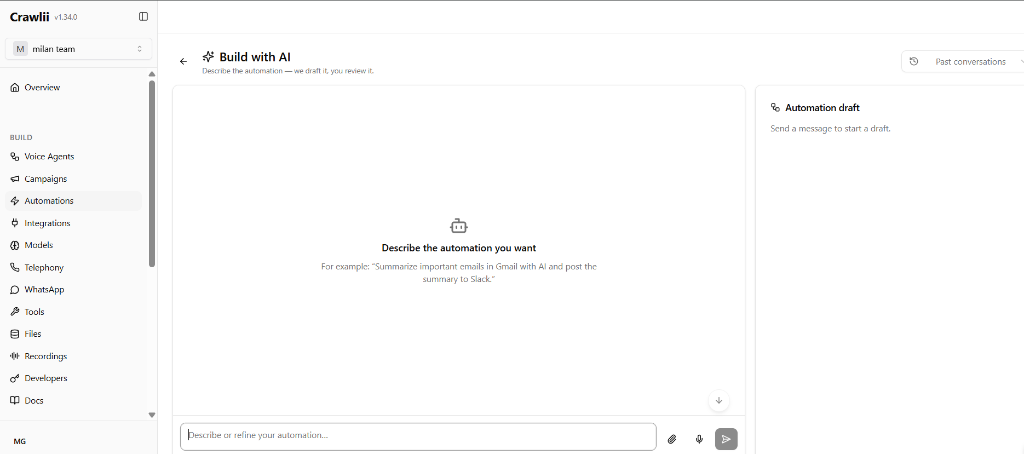
- 1Describe it in plain English
“Summarize emails and post to Slack”, that's the whole automation.
- 2Ground with docs & URLs
Attach knowledge so the plan is yours, not generic.
- 3Or just say it
Build automations by voice. Nobody else does this.
- 4Live plan preview
The draft appears here, nothing runs until you approve.
- 5Sessions persist
Resume any draft from Past conversations.
Build it three ways
Chat, voice, or a visual canvas, however you think, that's how you build.
Describe it
Type what should happen, “every morning, pull yesterday's signups from HubSpot, call each one, and email me a summary.” The builder drafts the plan: which apps to connect, the steps, a security review, and a cost estimate.
Say it
The same builder works by voice. Talk through the process like you'd explain it to a colleague, Crawlii turns it into a structured execution plan you review before anything runs.
See it on the canvas
Every plan is a visual graph you can open and edit, wait nodes, branches, error paths, approvals. Refine it conversationally or drag steps directly. Version history means you can always roll back.
What can start an automation?
Schedules, webhooks, app events, and the two nobody else has: before and after a phone call.
Manual & retry
Run now, run in background, or re-fire a failed execution from where it stopped.
Cron schedules
“Every weekday at 9am”, timezone-aware scheduling built in.
Event webhooks + Listen
Any external system fires your automation via a tokened URL. The Listen mode captures a real event so you can map the payload while you build.
Native app events
Slack and Gmail events arrive natively, when an email lands or a message posts, your automation starts.
Polling
Pollable tools let an automation check for new records on a schedule when no webhook exists.
Before a call
Fetch CRM data and inject it into the live agent's context, with a strict time budget so the call is never delayed.
After a call
Update the CRM, send the WhatsApp follow-up, create the ticket, fed by everything extracted during the call.
As a campaign source
An automation's output, “fetch today's lead list”, directly populates a calling or WhatsApp campaign.
One surface for the whole lifecycle
- 1
Describe
Tell the builder what should happen, it recommends apps, drafts a plan, and shows the security and cost review as it works.
- 2
Approve
Nothing runs until you say so. Review the plan, test-run it live from the chat, then publish.
- 3
Operate
Analytics, health, resilience, traces, and approvals live on the same page, no separate monitoring stack to wire up.
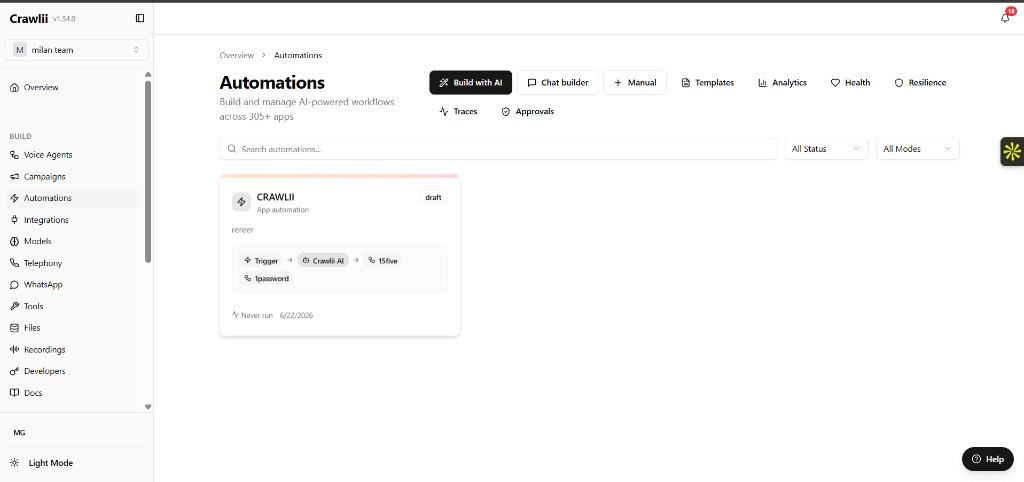
- 1Templates
150+ starter templates and a marketplace to build on.
- 2Analytics
Live usage, cost tracking, and run statistics per automation.
- 3Health
Every automation reports its own health, failures surface here first.
- 4Resilience
Circuit breakers, retries, and the dead-letter queue, in one view.
- 5Approvals
Human sign-off gates pause the flow until a reviewer approves.
Self-healing by default
Automations that survive flaky APIs, bad data, and 3am failures, and tell you about it in the morning.
Retries + circuit breakers
Every step retries with backoff. Per-app circuit breakers stop hammering a failing API and resume when it recovers.
Dead-letter queue + replay
Executions that exhaust retries land in the DLQ, inspect, fix, replay. Nothing is silently dropped.
Dry-run & node test
Simulate the whole plan without side effects, or test a single node against real data before you ship it.
Stall detection & reconciliation
Runs that wedge get detected and reconciled, the platform notices a stuck automation before your customers do.
Recoverable executions
Retry just the failed steps of any recoverable run, no re-running the parts that already succeeded.
Traces, audit & memory
Every run is traced and audit-logged. Results write back to customer memory, “renewal quote sent on the 12th” becomes a fact the next call knows.
One flow, not four products
In most stacks this takes a CRM, a dialer, a voice-AI vendor, and a workflow tool. In Crawlii it's a single automation.
Fetch leads → campaign → AI calls → approved follow-ups → CRM write-back, with an audit trail on every step.
Start from 150+ templates
Don't build from zero. Install a starter, adapt it in chat or on the canvas, and ship. When yours works, publish it back.
150+ starter templates across 20 typed categories
Version history, approvals, comments, real team workflows
A/B testing with traffic splits and per-variant analytics
Marketplace with ratings, installs, and author monetization
Built-in TRAI / TCCCPR compliance
India's calling-window and consent rules ship as a policy engine, not a PDF, evaluate in shadow mode first, then enforce. Pre-call and post-call automations inherit the same rules.
- 09:00–21:00 IST commercial calling windows
- Cross-channel opt-out, one suppression list for calls, WhatsApp, and email
- Tamper-evident audit ledger on every dial decision
- Tiered consent with evidence tracking and cooldowns
DLT registration and final legal sign-off remain the customer's responsibility.
See how the compliance engine works